> For the complete documentation index, see [llms.txt](https://rtx-dev.gitbook.io/rtxdev/llms.txt). Markdown versions of documentation pages are available by appending `.md` to page URLs; this page is available as [Markdown](https://rtx-dev.gitbook.io/rtxdev/rtx-shell-creator/guides/pools-kitchens-and-details.md).

# Pools, Kitchens & Details

Pools, kitchens, built-in furniture, structure and outside details.

{% hint style="info" %}
**Watch it:** [Stairs & pools - 2:14](https://www.youtube.com/watch?v=EPpvW_mne4Y\&t=134s) · [Details: structure, kitchens, built-ins & outside - 2:30](https://www.youtube.com/watch?v=EPpvW_mne4Y\&t=150s)
{% endhint %}

## Pools (O)

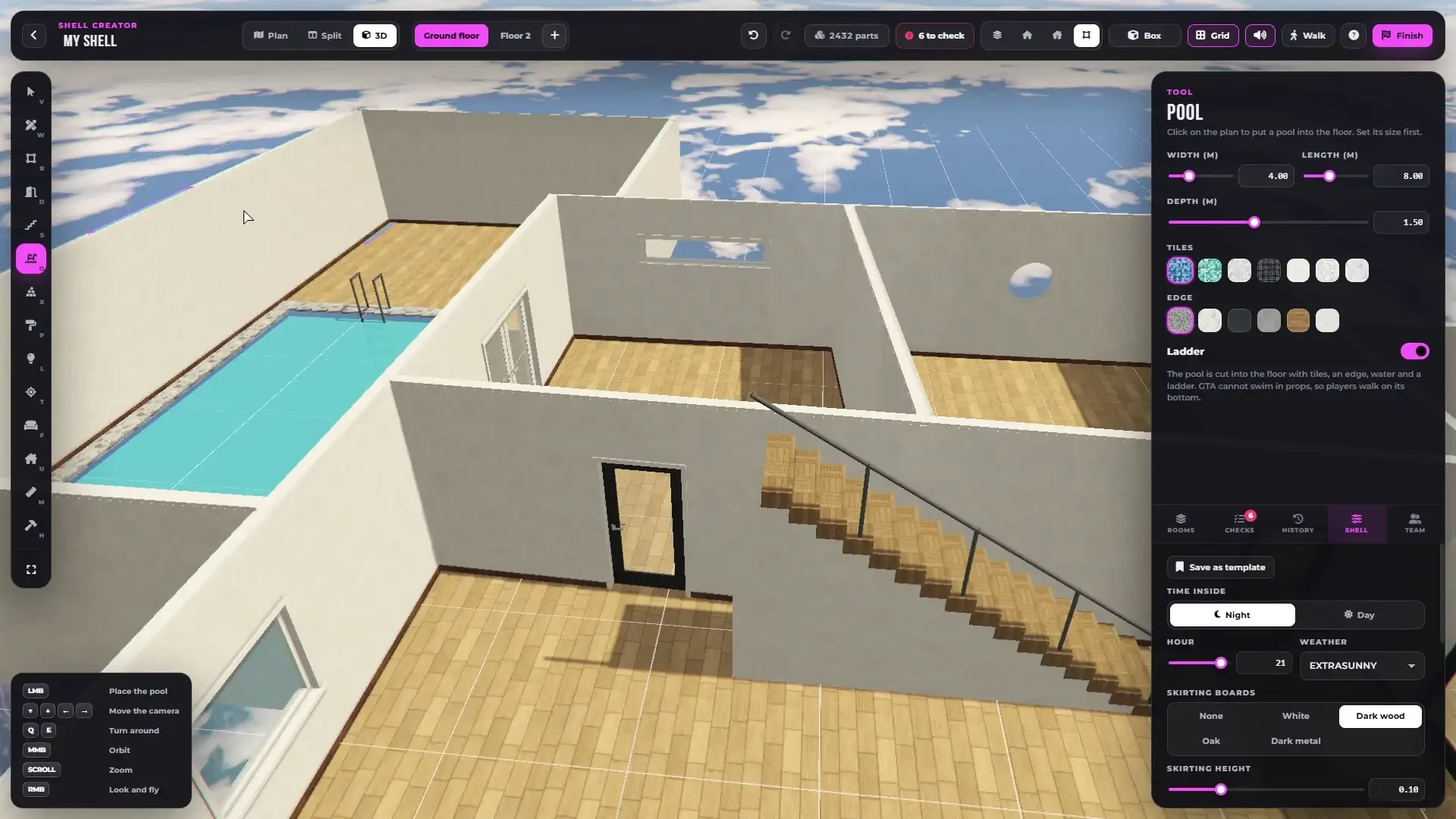
Click on the plan to cut a pool into the floor, with tiles, an edge, water and a ladder.

<figure><img src="https://1804361591-files.gitbook.io/~/files/v0/b/gitbook-x-prod.appspot.com/o/spaces%2FCGSsnvBAI11nCFRWfpsr%2Fuploads%2FZRtTzoUBTaC2EXZqeXlr%2Fshell-creator-pools.webp?alt=media" alt="A pool in the floor"><figcaption><p>A pool cut into the floor - size, tiles, edge and ladder.</p></figcaption></figure>

| Option | Range                                                                         |
| ------ | ----------------------------------------------------------------------------- |
| Width  | 1-12 m                                                                        |
| Length | 1-20 m                                                                        |
| Depth  | 0.4-3 m                                                                       |
| Tiles  | Blue, aqua, white and black mosaic, subway tiles, hexagon tiles, white marble |
| Edge   | Terrazzo, white marble, charcoal tiles, polished concrete, oak, white         |
| Ladder | On or off                                                                     |

{% hint style="info" %}
GTA cannot swim in props, so players walk on the bottom of the pool.
{% endhint %}

***

## Details (X)

The Details tool has four tabs. `R` turns a detail before you place it (`Shift + R` by 15°) and you drag a placed one to move it.

Wall details snap flat against the nearest wall and into the corner. Line details (railings, fences, hedges, half walls, beams and glass walls) are drawn with two clicks, like a wall.

### Structure

| Detail                        |                                                               |
| ----------------------------- | ------------------------------------------------------------- |
| Column                        | Square, floor to ceiling                                      |
| Round pillar                  | With a base and a top                                         |
| Ceiling beam                  |                                                               |
| Half wall                     |                                                               |
| Glass wall                    | Floor-to-ceiling glass partition with a slim frame            |
| Open floor                    | A hole to look down to the floor below, with a railing        |
| Platform                      | A raised floor, stage or step                                 |
| Floor area                    | A floor without walls - square, round or oval, or as an inlay |
| Glass railing / Metal railing |                                                               |
| **Ladder**                    | A real climbable ladder to the floor above, climbed with `E`  |
| **Elevator**                  | A real working elevator                                       |

### Elevators

Place the elevator on the **lowest floor** it should reach. It gets a shaft through every floor above, sliding doors on each floor and a moving cabin.

<figure><img src="https://1804361591-files.gitbook.io/~/files/v0/b/gitbook-x-prod.appspot.com/o/spaces%2FCGSsnvBAI11nCFRWfpsr%2Fuploads%2F4M9yZBjwLrA2VPoRYRAZ%2Fshell-creator-elevators.webp?alt=media" alt="A working elevator"><figcaption><p>A working elevator in a finished shell.</p></figcaption></figure>

In the finished shell players press `E` at the doors to call it, choose the floor inside and ride. Elevators and their sounds are synchronized for everyone in the shell.

### Kitchen

<figure><img src="https://1804361591-files.gitbook.io/~/files/v0/b/gitbook-x-prod.appspot.com/o/spaces%2FCGSsnvBAI11nCFRWfpsr%2Fuploads%2FLobBIUDLco8s7EF4nFYA%2Fshell-creator-kitchens-built-ins.webp?alt=media" alt="Kitchen units"><figcaption><p>Kitchen units with a built-in sink and hob.</p></figcaption></figure>

* **Kitchen units** with a worktop and a built-in **sink**, **hob** or both
* **Sink**, **Wall cabinets**, **Tall cabinet**
* **Kitchen island** with a built-in sink or hob
* **Bar counter** and **Counter**

Choose the door width of the fronts, the handles and the top.

### Built-in

Built-in wardrobe, Bathroom vanity, Media unit, Bookshelf, Fireplace, Built-in bench, **Walk-in shower**, **Bathtub**, Wall panelling and Wall mirror.

### Outside

<figure><img src="https://1804361591-files.gitbook.io/~/files/v0/b/gitbook-x-prod.appspot.com/o/spaces%2FCGSsnvBAI11nCFRWfpsr%2Fuploads%2FGVBjypGC9occXRSxH7aY%2Fshell-creator-balcony-outside.webp?alt=media" alt="Placing a balcony"><figcaption><p>Placing a balcony with a glass railing from the Outside tab.</p></figcaption></figure>

**Balcony**, Lawn, **Terrace**, **Wooden deck**, Garden path, Flower bed, Hedge, Planter, Fence, Garden wall and **Pergola**.

A balcony goes outside a wall, with a floor and a glass or metal railing. Add a French door to step out.

***

## Selected Detail

Length, depth, height, height above the floor and materials, where they fit the detail. **Turn 90°**, **Turn 15°**, **Duplicate** and **Delete**.
